Knowledge Base Article
What Happens When Two People Edit the Same Record at Once
Argenta lets two people open the same record at the same time. It does not let the second save quietly wipe out the first, and this article is about the warning that stops it.
What You See
You press Save and, instead of the usual confirmation, you get a warning that somebody else changed what you are editing while you had the page open, so nothing was saved. On the Lead Scoring, Constituent Scoring and Giving Capacity pages it appears as a message on the page itself:
"Somebody else changed these settings while you had this page open, so nothing was saved. Reload the page to see their version, or press Save again to overwrite theirs with what is on your screen."
The contact forms in your customer and agency portals, and the Group Mission Trips portal update pages, show it on the page above the form too. Everywhere else it arrives as a popup you dismiss with OK. The popup is headed Somebody else changed these settings (or this record, or this message), and its wording names what was changed, for example "These email addresses were changed by someone else while you had this page open, so nothing was saved." The choice it gives you is the same on every page: reload to see their version, or save again to overwrite it.
A record workspace protects you the same way, with different wording. When you press the Save icon in the record's title bar and someone else has saved the record since you opened it, a red banner appears and stays:
"Your changes were NOT saved. Somebody else changed this record while you had it open."
A popup carries the same refusal and waits for you to dismiss it. Behind it the banner stays on the page, so the refusal is still in front of you when you decide what to do. The banner carries a Reload This Record button. Reloading discards what you typed. To keep your version instead, press Save again.

The banner on a record workspace. It stays after you dismiss the popup.
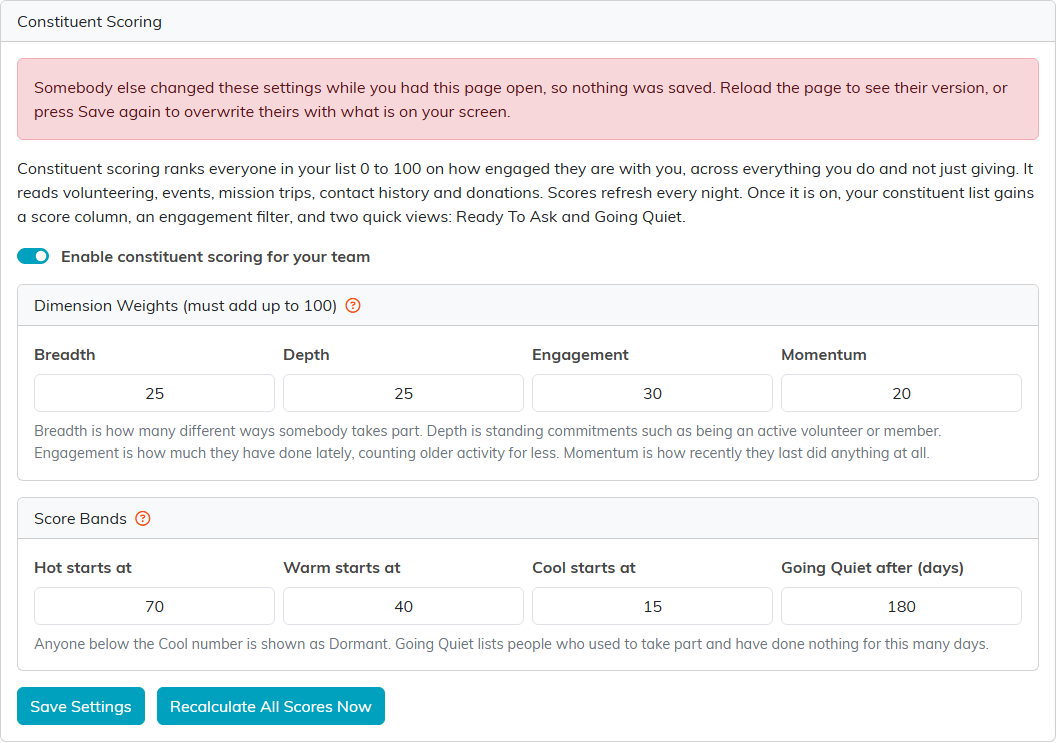
The warning on the Constituent Scoring page. Nothing was saved, and the Save button is still there for when you decide.
What It Means
Nothing was saved. Your changes are still on your screen and the stored record still holds their version. Nothing has been lost on either side yet, which is the whole point of the warning.
It fires when the record was saved by somebody else between the moment your page loaded it and the moment you pressed Save. It also fires when that somebody else was you, in a second browser tab you had forgotten was open. In that case the warning names you rather than a colleague. It is headed "You changed this in another window" and reads:
"You saved a newer version of this record somewhere else, in another tab or window, so what is on this screen was NOT saved over it. Reload the page to bring up your newer version, or press Save again to replace it with what is on this screen."
What you do about it is the same either way. Only the wording changes, so you can tell at a glance whether the version you are about to overwrite is a colleagues or your own.
What To Do
- Reload the page to discard what is on your screen and see their version. Take this one when you are not sure what they changed.
- Press Save again to overwrite their version with what is on your screen. The second press goes through. The warning appears once, not every time. The exception is a task someone locked or set to View Only while you had it open: if that leaves you without access, Save is refused with a Record Locked or View Only message every time, and nothing you saved replaces theirs or removes the lock.
There is no merge, so it is one version or the other. If their change matters as much as yours, reload, look at what they did, then put your change back on top of it.
Where You Will Meet It
It runs on records that are edited as a whole, where a save posts every field on the page rather than just the one you touched. That is the shape where a forgotten tab can rewrite a colleague's work without either of you noticing.
The Subscription Settings pages are the ones most teams hit first, because a whole team shares them: Email Settings, Our Dashboard Message, Lead Scoring, Constituent Scoring, Giving Capacity and Volunteer Settings. The public form design pages for campaigns, events, donations, email and text carry it too. Record workspaces carry it as well, from the Save icon in the record's title bar. It now runs from a tab's own Save button too, which it did not used to: a constituent's Personal, Contact, Addresses, Communication, Delivery, Other, Housing Info, Health, Military, Voting, Education, Constituent Bio and Org Details tabs, the Text tab of a Policy and of Meeting Minutes, a website's Domain, Hosting and Servers tabs, a property's Financials tab, and the Specifications and Notifications tabs of a task and of a project. Saving from one of those used to go straight past the check, so a second tab could roll a colleague's change back with nothing said. Your volunteer and customer portals carry it too, on the profile page a portal user edits, so a second tab they had forgotten about cannot quietly roll back what they saved a moment earlier.
Discussions carry it as well, on a thread and on a reply. That covers Announcements, Board Member Discussions, Team Member Discussions and a project's own Discussions tab, which all run the same board. Dragging a card between columns on the Project Board, the Task Board or the Grant Pipeline is covered too: a drag from a tab that is out of date warns you and leaves the newer status alone, and dragging it again replaces it. Editing a thread somebody else has saved since you opened it gives you:
"This discussion was changed by someone else while you had it open, so it was NOT saved. Reload the page to see their version, or press Save Changes again to overwrite it with what is on your screen."
A reply is protected the same way, worded for a reply and pointing at that form's Save button rather than Save Changes. Neither one is a wall: press the button a second time and your version goes in.
On Our Dashboard Message the warning names the message rather than the settings, and points at the button that page actually uses:
"This dashboard message was changed by someone else while you had it open, so it was NOT saved. Reload the page to see their version, or press Save All Changes again to overwrite it with what is on your screen."
That page matters more than most, because the message it holds is the one your whole team reads when they sign in.
Portal Dashboard Message cannot tell whether the newer save was yours or a colleague's, so its warning names both, headed Changed in another tab or by someone else: "This portal dashboard message was changed since this page loaded, in another tab or by someone else, so it was NOT saved. Reload the page to see the newer version, or press Save Message again to replace it with what is on this screen."
Journal entries, bills and invoices carry it as well, each pointing at its own Save button. A journal entry gives you:
"This journal entry was changed by someone else while you had it open, so it was NOT saved. Reload the page to see their changes, or press Save Journal Entry again to overwrite them with what is on your screen."
A bill reads the same and points at Save Bill; an invoice points at Save. As everywhere else the warning comes once, and a second press goes through. A bill amount you change right in the bills list is checked too: the box goes back to the amount stored now, and typing yours again replaces it.
Calendar appointments carry it too, from the Save icon in the appointment's title bar and from Save All Changes & Exit. That matters most on your organization's shared calendar, where two people editing one appointment is normal. Saving an appointment somebody else changed since you opened it gives you:
"This appointment was changed by someone else while you had it open, so it was NOT saved. Reload the page to see their changes, or press Save again to overwrite them with what is on your screen."
If the newer save was your own, in another tab, you get the "You changed this in another window" warning described above instead.
User roles carry it as well, from the role's own Save All Changes & Continue and Save All Changes & Exit buttons. A role saves every permission switch on the page at once, so without the warning a tab opened before a colleague switched a permission off would quietly switch it back on. Saving a role somebody else changed since you opened it gives you:
"This role was changed by someone else while you had it open, so it was NOT saved. Reload the page to see their changes, or press Save again to overwrite them with what is on your screen."
Event ticket sales carry it too, from the Save Changes button at the bottom of Event Ticket Details. Saving a ticket sale somebody else changed since you opened it gives you: "This event ticket sale was changed by someone else while you had it open, so it was NOT saved. Reload the page to see their changes, or press Save again to overwrite them with what is on your screen."
Portal documents carry it too: on the Portal Document Workspace, from the Save icon and Save & Exit Record, and on the Edit Document page inside your portal, from its Save button. Saving a portal document somebody else changed since you opened it gives you: "This portal document was changed by someone else while you had it open, so it was NOT saved. Reload the page to see their changes, or press Save again to overwrite them with what is on your screen." The portal page says the same, worded for a document.
Email automations and email templates carry it too. An automation checks before Save All Changes, its status buttons and Send Me A Test Email; a refused status change or test send does not happen either. A template checks before Save All Changes, Save All & Exit Record and SEND, and a refused send sends nothing. So do the bottom Save buttons on a staff position's Job Description, a client's Delivery Info and Terms of Agreement, and an inventory lending list's List Details.
Notes carry it too. Editing a note on a record's Notes tab checks before Save & Continue and Save & Exit, so a note left open in an older tab cannot write over a newer save of the same note. It gives you: "This note was changed by someone else while you had it open, so it was NOT saved. Reload the page to see their changes, or press Save again to overwrite them with what is on your screen." A constituent's Health Questionnaire checks before its Save button, and Queued Email Details before Save All Changes and Save All & Exit Record. Each says the same, worded for a health questionnaire or a queued email.
The same check covers Event Committee, Checklists, an Event Guest Group, every Contact Log editor (on a record, on the Master Contact Log and on My Contact Log) and the guest names your sponsors fill in on their own manage page. On Event Committee, Save All Changes saves only the rows you changed, so a row you never touched cannot roll back a colleague's edit. A contact log entry gives you: "This contact log entry was changed by someone else while you had it open, so it was NOT saved. Reload the page to see their changes, or press Save again to overwrite them with what is on your screen." The others say the same, worded for what you were editing.
The same check now runs on Reservations: a reservation, a bookable space, an occupant and a stay's room segments. It also covers mission trip types, a volunteer task's Contact & Location, auction public form design, event seating tables, a staff member's payroll, mission project clients, campaign sale items and pickup details, event session teams, list group lists, material donation and distribution items, and the projected income and expense lists of auctions and campaigns. On the projected income and expense lists, campaign sale items, list group lists and room segments, each row is checked on its own and Save All saves only the rows you changed, so a row you never touched cannot roll back a colleague's edit. On material donation and distribution items, the stored quantity is checked before any stock moves. A mission trip enrollment request is checked before Save & Continue, Save & Exit and Send Approval Notification, and a refused send sends nothing. A mission trip participant form is checked before Save All Changes, and so are the participant's contact details it writes (and a parent's, for a participant under 18), so an edit made on the constituent's own pages is not quietly undone. Mail Room List Details and a question in the Survey Question Builder are checked when you save too, each worded for a list or a question.
An event carries it on its Details, Public Form Design, Ticket Settings, Notifications templates, Meal Choices, Additional Guests, Projected Income and Projected Expenses pages, and a program on its Projected Income and Projected Expenses pages. On Ticket Settings, Additional Guests and the projected income and expense pages, each row is checked on its own.
It also runs on the rows a record keeps on its tabs: a task group's Tasks, a client's Contacts, a website's Spec Lists, a project's Team, a constituent's Employment and Family tabs, an event guest's additional guests, a stay's occupants, the event sessions list, mission trip and enrollment vehicles, the mission trip wait list, and the fee, credit and scheduled payment lines on a mission trip enrollment's Billing page, and the status and Number Enrolled row Save on the Mission Trip Enrollments list and on a mission trip's or account's Enrollments tab. Each row is checked on its own. On a task group's tasks, spec list items, a stay's occupants and the event sessions list, the button that saves everything saves only the rows you changed. The same check covers Calendar Info, Group Member Details, the Connections tab of an invoice, an expense and meeting minutes, time sheets and their task details, account transactions, campaign sales and their items, the Approval tab of a time off request, and the response and email sections of Campaign Analytics. On a campaign sale, Save All Items in Items in this Campaign Sale saves only the items you changed.

The Subscription Settings pages that carry the warning, on the Subscription Settings menu.
When The Record Was Deleted
One more case has its own message. If a constituent is deleted while one of their pages is still open somewhere else, saving that page tells you: "This constituent has been deleted since this page was opened, so your changes were not saved." Your edits stay on the screen, so you can copy anything you still need before you leave. There is nothing to reload, because the record is gone.
A seating table works the same way: saving its details page after the table was deleted elsewhere tells you "This table has been deleted since this page was opened, so your changes were not saved." So do the Projected Income and Projected Expenses pages of an event, an auction, a campaign or a program. There the message names the projected income item or projected expense that was deleted, says your changes were NOT saved, and asks you to reload the page to see the current list. Pressing Save again does not help; reload first.
Every other record and list now works the same way. Saving a record that was deleted while its page was open tells you: "This record has been deleted since this page was opened, so your changes were NOT saved. Reload the page to see what is there now." Saving a list, such as a checklist, after one of its rows was deleted elsewhere names the row that went, for example "The checklist item "Call the venue" was deleted since this page was opened, so your changes were NOT saved. Reload the page to see the current list." Nothing is written in either case, so reload before you try again.
Best Practices
- Close the second tab. Most of these warnings are one person with the same record open twice.
- Read it rather than pressing Save twice out of habit. The second press is a decision to overwrite somebody.
- On a settings page your whole team shares, say so in Chatter before you edit. The warning is a safety net, not a way of coordinating.
