Knowledge Base Article
Understanding Giving Capacity on a Constituent
Giving Capacity estimates what a constituent is able to give, using the public federal campaign giving records, and shows you every record behind the figure. It has its own tab on the constituent record, kept separate from the Constituent Score on purpose: the Score measures how connected somebody is to your organization, and this measures what they can afford.
Turning It On
The tab appears only for a team that has switched the feature on. A subscription admin turns it on at Subscription Settings > Giving Capacity.
- Switch on Enable giving capacity for your team.
- Under How Sure Before We Show It, choose the Match confidence needed.
- Click Save Settings.
Before it is switched on, the page reads Giving capacity is not turned on rather than showing an empty estimate, because nobody has been looked up yet.
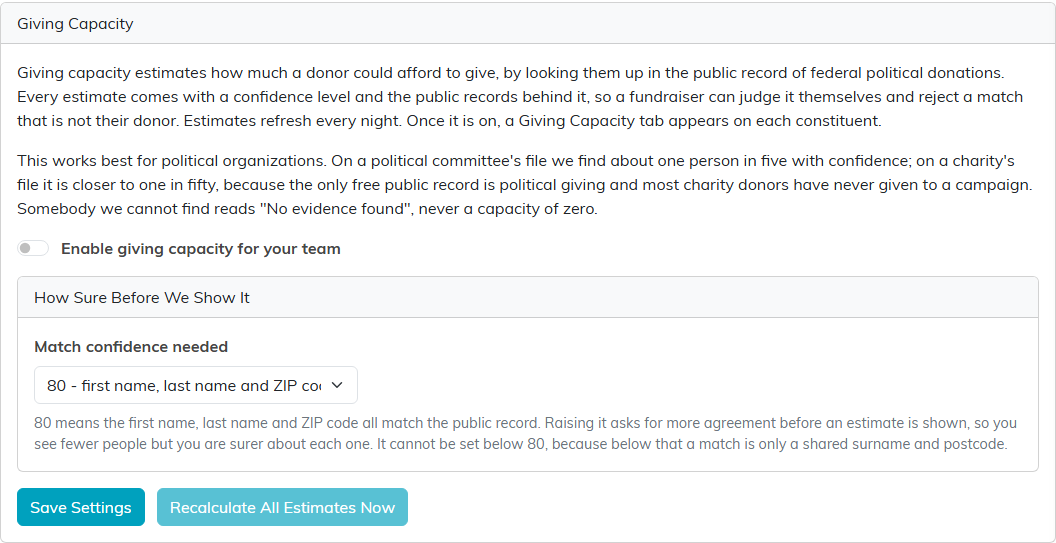
Giving Capacity under Subscription Settings.

What a constituent's tab shows until the feature is switched on.
Match Confidence Needed
This setting is how closely a public record has to agree with your constituent before Argenta will use it.
- 80: the first name, last name, and ZIP code all match. This is the lowest setting available.
- 90: the city matches as well.
- 95: the state matches too, and this is the strictest.
Raising it asks for more agreement before an estimate is shown, so you see fewer people and you are surer about each one. It cannot be set below 80, because below that a match is only a shared surname and postcode.
One case is worth knowing when somebody you expected is missing. The first name has to match properly to reach 80. Where the public record matches only the nickname on your constituent, the match scores lower than the floor and that person is left out at every setting, not just the strict ones. A first initial on its own counts for less again. If a donor you are sure about never appears, check that their legal first name is on their record rather than only the name everybody calls them.
Reading the Estimate
Estimated Capacity is a range rather than a single figure, and a confidence level sits beside it. That confidence can never be higher than the confidence in the match itself, so a person Argenta is less certain it identified carries a lower confidence on the money as well.
Where the figure reads At least an amount, that donor gave the most federal law allows, so their real capacity is higher than the band shows. The page says so on the record.
Alongside it you get Total Federal Giving, Largest Single Gift, Gifts On Record, Most Recent Gift, Match Confidence, and Last Calculated. How This Was Worked Out explains in plain words which of those figures the estimate was anchored on.
Public Records Behind This Estimate
No figure is ever shown without at least one public record behind it, and all of them are listed. Each one carries the name and place as they were filed, the election cycle, the employer and occupation reported, what was given that cycle, the largest gift, and Why We Matched This with its score out of 100.
Check them against the person you know. If one of them is not your donor, click the reject icon on that record, labelled This is not my donor. The estimate is worked out again without it. Rejecting changes the record, so it follows the same view-only and locked rules as any other edit, and Argenta keeps a note of who did it.
When There Is No Estimate
A constituent Argenta found nothing for reads No evidence found. There is deliberately no number and no zero there, because a figure reads as a finding. It means the public federal records do not mention this person, and it is not a statement about what they can afford.
Keeping the Figures Current
Estimates are worked out every night for each team that has the feature on, and also when you save your settings, when you click Recalculate All Estimates Now on the settings page, and for one person when you reject a record on theirs. Last Calculated on each constituent tells you when that person's figure was last worked out.
