Knowledge Base Article
Where To Add A Location In Argenta
If you are hunting for where to add locations in Argenta, there is no Locations list to find, and that is usually the real answer to the question. A location is not a record you keep on its own. You add it to the thing that happens there, so you will find it on the event, or on the volunteer task, rather than in a module of its own.
Add a location to an event
- Go to Events and open the event.
- Click Contact & Location in the workspace menu on the left.
- In the Event Location card, choose a Location Type. That choice decides how you give Argenta the address.
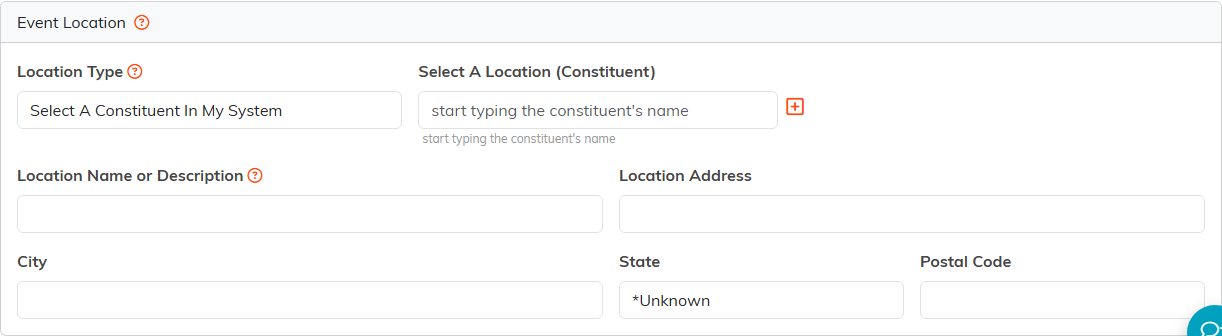
The Event Location card, on the event's Contact and Location page.
The Location Types
- Select A Constituent In My System uses a place you have already saved as a constituent, and brings its address along with it.
- Enter A Location Manually lets you type the name and address in by hand.
- Use The Same Location As The Event appears on a session, not on the event itself. It reuses the address already held on the event, which is what you want when a session happens in the same building as its event.
- Select A Chapter & Use The Chapter's Address takes the address from one of your chapters and fills it in for you.
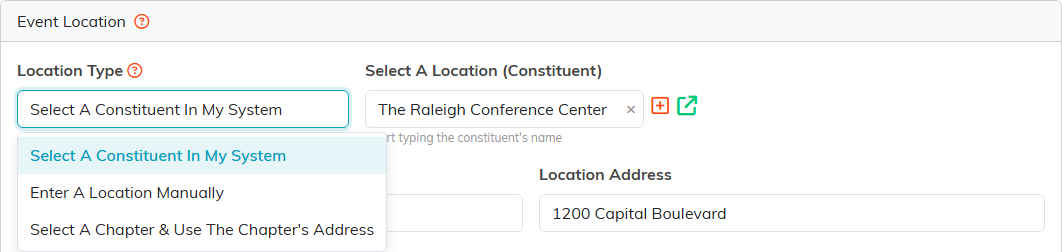
The three ways to give an event its location.
A venue you use over and over
If you run events at the same hall every year, save that hall once as a constituent. From then on you pick it with Select A Constituent In My System instead of typing the address again, and if the address ever changes you correct it in one place rather than on every event.
Volunteer tasks
A volunteer task has its own Contact & Location page, in the same spot in its workspace menu. It works a little differently: there is no Location Type to choose, so you type the task location name and address straight into the fields.
