Knowledge Base Article
See How Full Each Mission Trip Is
The Mission Trip dashboard shows every location and week in a season with its capacity, how many people are registered and how many places are left. The fullest trips sit at the top, so the ones close to selling out are the first thing you see.
Getting There
Open your Dashboard, then choose Mission Trip Dashboard from the Dashboard list at the top of the page.
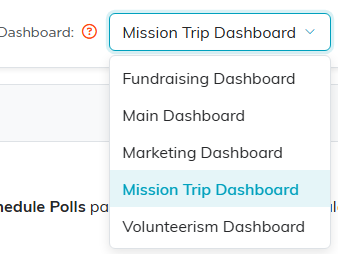
Choose Mission Trip Dashboard from the list at the top.
Scroll down to Location & Week Capacity.
What Each Column Means
- Location and Code – where the trip is, and its trip code. The code is worth reading, because one location often runs several different weeks.
- Week – the start and end dates.
- Product – the trip type.
- Capacity – the most people that trip can take.
- Registered – how many people are signed up.
- Remaining – the places still open.
- Full – a bar and a percentage.
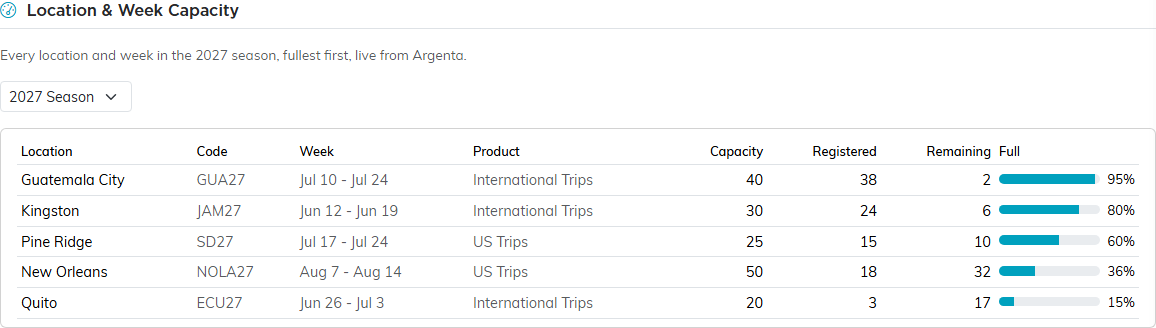
Every location and week in the season, fullest first.
Three Things Worth Knowing
Registered counts people, not bookings. One enrollment can bring a group of fifteen, and all fifteen are counted here. Canceled enrollments are left out, and so are canceled trips.
A trip with no capacity set reads "no capacity set" instead of a bar, and sorts to the bottom. There is nothing to work a percentage from, so the panel says so rather than showing a confident 0%.
An over-booked trip shows its Remaining in a pink pill. If more people are registered than the trip can take, the number of places left goes negative and is highlighted so you can see it at a glance.
Looking at a Different Season
The panel opens on the season you are currently selling. From July onward that is next year's season, because registration for next summer opens the previous June.
Use the season list to look at another year. Only seasons you actually have trips in appear in it.

The season list sits just above the table.
The whole panel is read from your live enrollment data, so it changes as people register. If your team has no trips in the season, the panel does not appear at all.
