Knowledge Base Article
Reading the Material Distributions Monthly Report, and Why Year-to-Date Is Smaller
The Material Distributions Monthly Report puts a full year of material distributions, and the material donations you received, on one page. The months run across the top and a Year-to-Date column sits on the end. It is in the Report Center, and it exports to CSV and PDF.
Each month carries # Households, # Individuals (the people in those households), # Items and $ Value. Agencies and Household size not recorded appear as their own rows when they have something to show. So if you want how many people you served in a month, or how household sizes moved across the year, this is the report.
Most of this article is about one column, because Year-to-Date is the part people query.
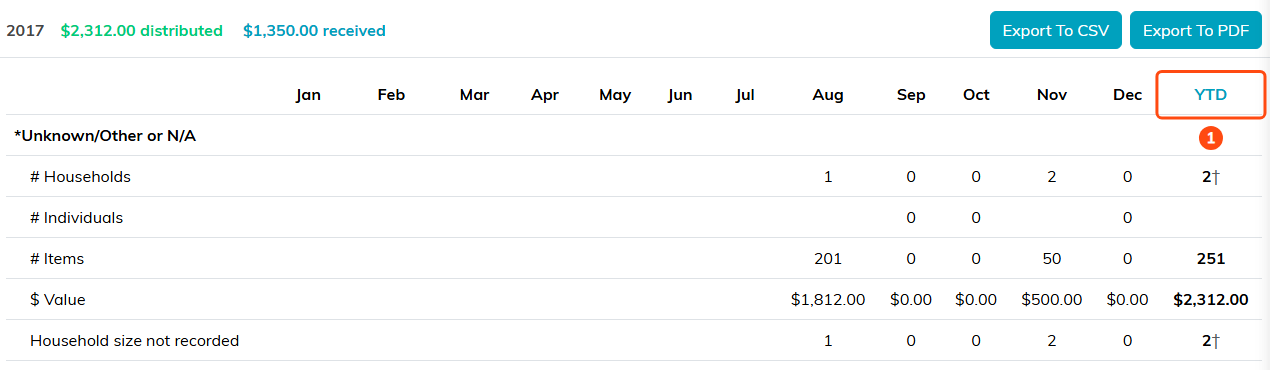
The months run across the top and Year-to-Date sits on the end (1).
Why Year-to-Date is smaller than the twelve months added up
Add the twelve monthly figures for households and you will get a bigger number than the Year-to-Date cell. That is correct, and it is the whole point of the column.
Each month counts a family once. So a family who got a delivery in March, in July and again in November is counted in all three of those months, which is right for a monthly figure. Adding those months together would then count that one family three times, and you would be reporting three families served when you served one.
The Year-to-Date column counts each family once for the whole year instead. It answers a different question: not how busy each month was, but how many different families you reached.
Both numbers are true and they are not meant to reconcile. If you need the number of families you served this year, that is Year-to-Date. If you need how many deliveries went out, that is the months.

One family in August (1) and two in November (2) is three deliveries, but only two families for the year (3).
Which rows add across and which do not
A dagger symbol marks any Year-to-Date figure that is counted rather than added. Those are the people rows: households, individuals, agencies, and household size not recorded.
The rows that count things rather than people do add across normally. Items, dollar value and the donation counts sum from the months into the Year-to-Date exactly as you would expect, so those columns can be checked with a calculator and the people rows cannot.
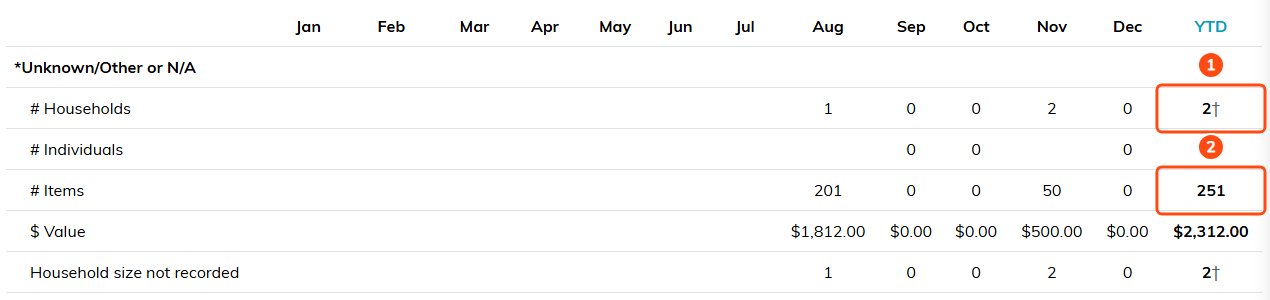
Households carries the dagger because it is counted (1). Items adds across, so 201 and 50 make 251 (2).
Families and agencies are reported separately
Distributions to agencies are kept apart from distributions to families and individuals. An agency passing goods on to the people it serves is not the same event as a family receiving them directly, and folding the two together would overstate how many households you reached.
An empty cell is not a zero
A blank month means that month falls outside what your organization has recorded, not that nothing happened. A zero means you recorded that month and nothing went out. Reading a blank as a zero is the easiest way to misread this report, especially in the first year you use it.
For the same reason, a Year-to-Date cell is left empty when any month in that row is unknown. A total covering nine months of a twelve month row would read as a year and quietly understate it, so the report declines to show one rather than show a number you would trust too much.

January is blank because it falls outside what this team recorded (1). September holds a zero, which means it was recorded and nothing went out (2).
If sizes were not recorded
A household with no size recorded counts as one person in # Individuals, the same rule the Material Distribution Types report uses, so a family is never counted as zero people. The Household size not recorded row shows how many households that was, in each month and for the year. It is a prompt to fill in the household sizes, not an error.

Individuals counts one person for each household with no size recorded (1), and the count of those households appears in its own row (2).

The report prints the same explanations under the grid.
Before you quote a figure from this report
- Say which number you mean. How many families you served this year is the Year-to-Date column; how many deliveries went out is the months added together.
- Check for blanks before you total anything by hand.
- If a funder asks for both, give them both and say what each one counts. The gap between them is repeat service, which is usually a good story rather than an awkward one.
